Home
The first impression, and where it sends a shopper next.
Peak season is coming whether your storefront is ready or not. Get a free store audit and find out which one it is.
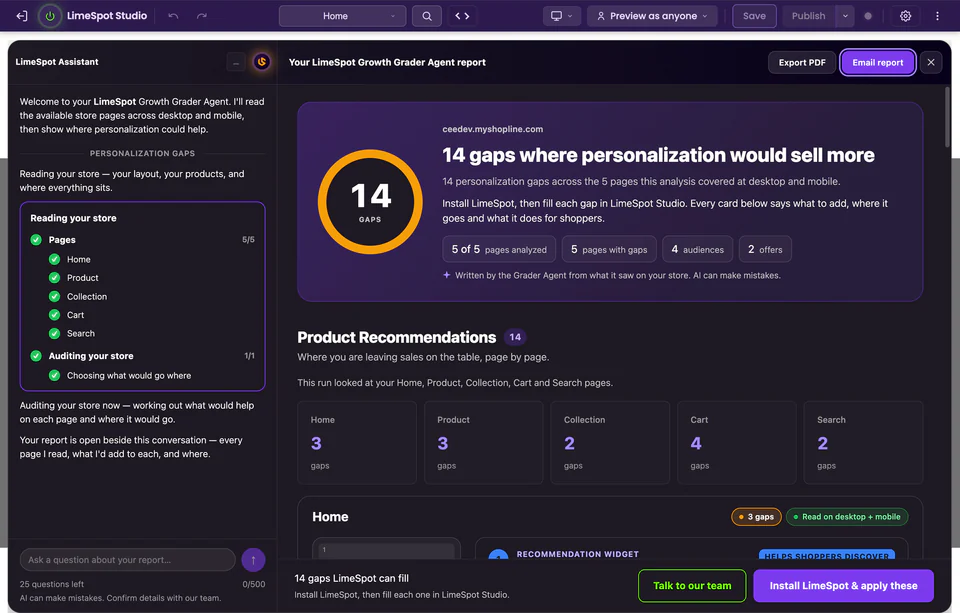
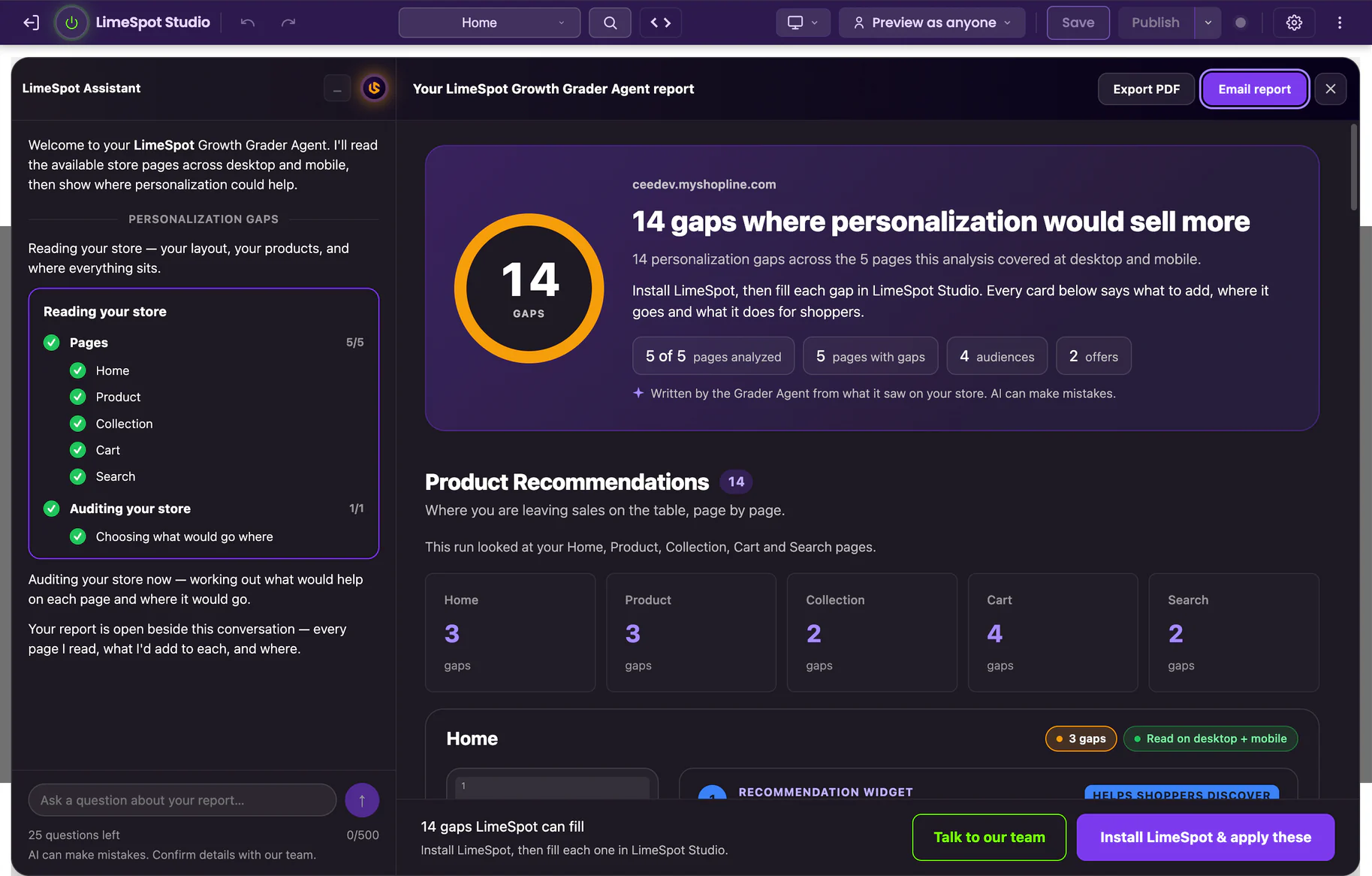
The LimeSpot Growth Grader Agent reads your storefront the way a shopper meets it, then hands back one grade, the factors behind it, and the fix for each. It audits the five page types that carry your revenue, at desktop and mobile width, and tells you where you are losing the traffic you already have. It is free, it is read-only, and it runs on any Shopify, BigCommerce or SHOPLINE storefront you can open, including one you don't own.
The grade takes minutes. The fixes take longer than that — which is the whole reason to know now rather than in the middle of your busiest weeks.
Free, read-only, and no limit on how many stores you grade. Chrome, Edge, or Firefox. Shopify, BigCommerce and SHOPLINE. A work email is all we ask for — no card and no call.
Inside the report
A factor, and the fix underneath it
Every factor comes with what to change, and where:
Product · No related item anywhere on the page
Add a related-products row under the buy box, desktop and mobile.
Cart · The order closes without an offer
Offer a cross-sell before checkout, sized to your cart drawer.
Search · A thin result set ends the visit
Fall back to recommendations when a query returns little.
An illustration, not a preview. Your store's report comes from its own pages.
What the Grader Agent does
LimeSpot is a fleet of specialist agents that work a live storefront. The Growth Grader is the first of them, and the only one that stops at reading.
It opens your pages, looks at what a shopper would actually see, and grades what it finds. It writes nothing. It installs nothing into your theme. Nothing a shopper can see changes, during the run or after it. Whether the rest of the fleet ever gets to work on your storefront is a separate decision, made later, by you.
That is the whole job. Read the store. Grade the store. Hand you the grade and get out of the way.
Peak season readiness
Traffic goes up in peak season. Conversion rate does not go up with it.
That is the whole problem in one line. A product page that gives a shopper nowhere to go next gives more shoppers nowhere to go next when the season arrives. A cart that never raises the order never raises a bigger pile of orders. A search that returns nothing returns nothing to more people. Whatever your storefront does with a hundred sessions is what it will do with ten thousand, and the loss scales with the traffic rather than shrinking under it.
So holiday readiness is a storefront question before it is a marketing one. Paid traffic costs the most in the weeks it matters most, which makes those the worst possible weeks to be sending it into pages that are not converting.
The urgent part is not the audit. It is everything that has to happen after it.
The audit is one run. The fix is not. A change has to be decided, made, reviewed, published, and then given enough traffic to show whether it worked — and if it didn't, changed again. That is weeks of ordinary work, and it is work you cannot compress. Once the season is underway, rebuilding a page that is currently taking orders is a risk at the worst possible moment, and it is a risk worth declining. Which means the storefront you go into peak season with is, in practice, the storefront you come out the other side with.
A merchant reading this in a quiet week has time to fix what the grade names. A merchant reading it late has a list and nowhere to put it. The audit is the same either way. The difference is entirely what you can still do about it.
Peak season arrives on its own schedule. Every shopper who lands on a page that gives them nothing is a shopper you already paid for, already earned, and are not getting a second run at — they do not come back later because you got organised.
And that cost is not waiting for one particular day to arrive. It runs continuously. A dead-end product page loses a little on a quiet Tuesday and a great deal on your biggest day, and it has been losing the whole time in between. Nothing about it expires — it just compounds, and peak season is when it compounds fastest.
So the reason to run it today has no offer attached to it. The audit is free, there is no cap on how many you run, and it will still be here next month. What will not still be here is the runway to use it. The deadline is the one your own calendar already set, and knowing early is the only thing that buys you room to act on it.
What it looks at
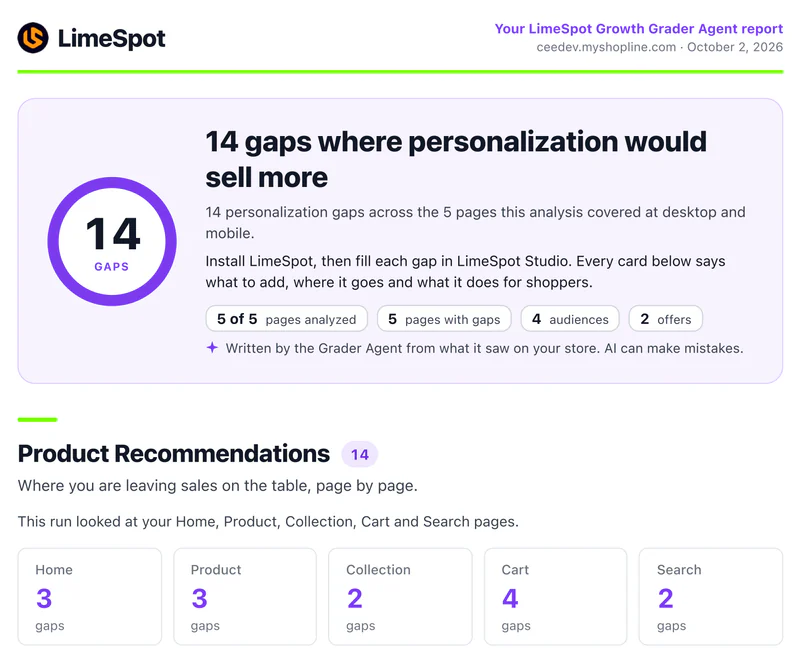
The Grader Agent does not crawl every URL you have. It reads the five page types that carry the revenue, finding them the way a shopper would, from your store's own links:
Home
The first impression, and where it sends a shopper next.
Product
Where the decision gets made or lost, and where a related item either appears or doesn't.
Collection
How a browsing shopper finds a second thing to want.
Cart
The last chance to raise an order before it closes.
Search
What happens when a shopper tells you exactly what they want.
If your storefront does not expose one of them, the report says so rather than guessing at it.
It reads each of those at a desktop width and a mobile width at the same time, not one after the other. Your store gets built on a laptop and shopped on a phone, and those can behave like two different stores, so the Grader looks at both versions of the same page in the same breath. A phone problem never gets averaged away by a desktop that happens to be fine — which matters most in the season when the phone share of your traffic is at its highest.
What you get back
The report opens with one headline grade for the storefront. Underneath it are the factors that produced it, each graded on its own, so you can see which part of the store is carrying you and which part is holding your conversion rate down.
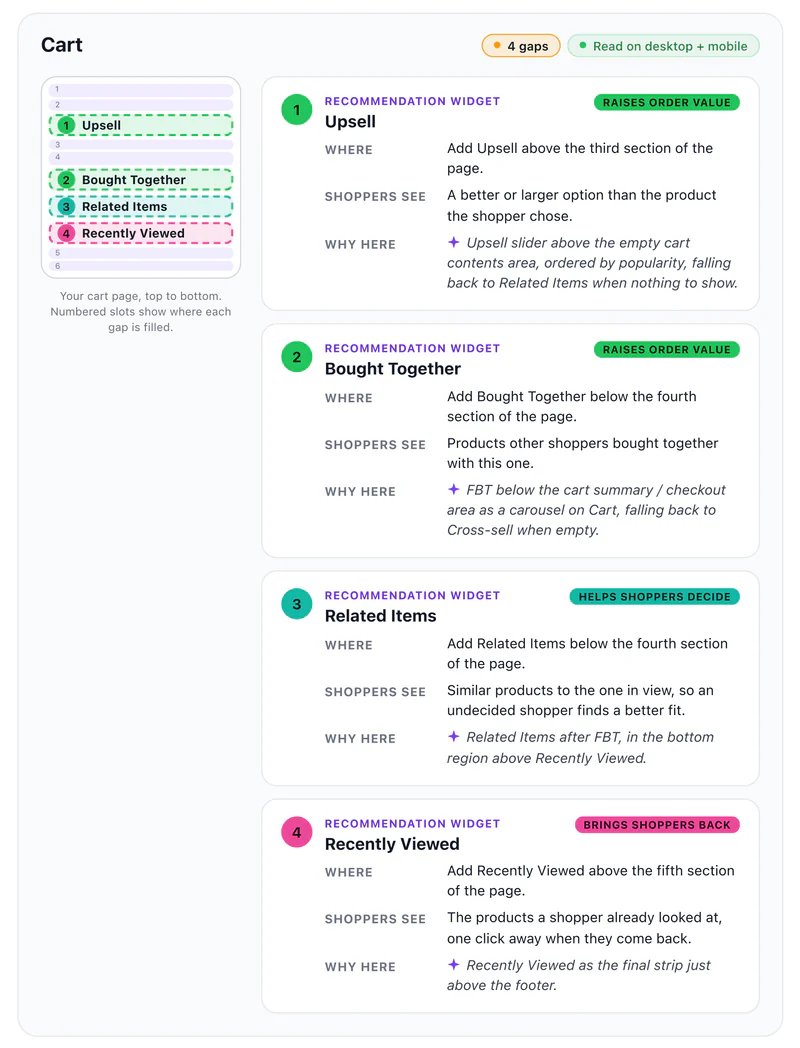
Every factor comes with the fix. Not “improve product discovery,” but what to change, on which of the five page types, and whether it's a desktop problem, a mobile problem or both. Where a product page has no related item, it says so. Where the cart closes without ever offering an upsell or a cross-sell, it says so. Where merchandising on a collection page is putting the wrong things first, it says that too.
It is written to be forwarded. Your developer, your agency or whoever runs merchandising can act on it without you translating it first, and every fix is written so it can be done by hand if that is what you would rather do.
What you do with it
The grade says where the storefront stands. The rest of the report is the part you act on.
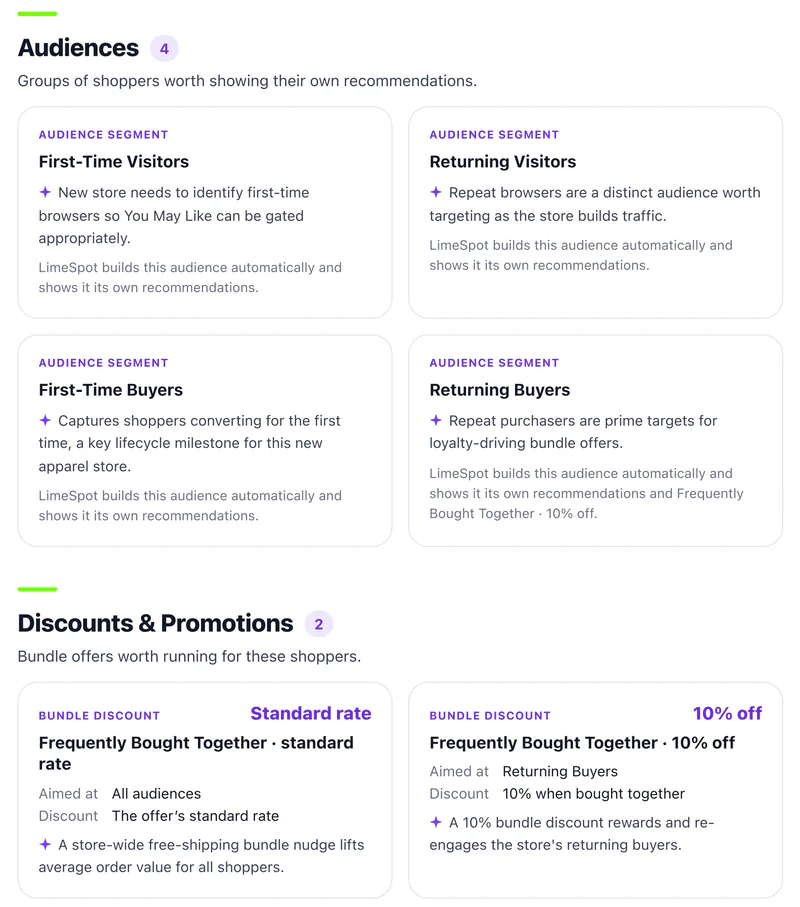
The findings are split by page type, so what the Grader Agent finds for Home — Most Popular, Recently Viewed — sits apart from what it finds for Product, Collection, Cart and Search. Each page comes back with its own list of recommendation and offer ideas.
Every idea is something you can put on the page and look at: related items under the buy box, a cross-sell in the cart, a progress incentive before checkout, merchandising placements on a collection. You place them in LimeSpot Studio, the editing surface on your own storefront, in the page itself.
Decide which of them fit your store, and who does the work: you, your agency, or the fleet. The report reads the same either way, and running it commits you to none of it.
AI visibility
Shoppers are starting somewhere new. A question that used to go into a search box now goes into ChatGPT, Perplexity or Google's AI answers, and what comes back is a short list of products and stores. Being on that list is a different job from ranking in a results page, and there is no line in your analytics that tells you how you are doing at it.
The audit checks three things and reports what it finds.
Whether these systems are allowed to read your storefront at all comes down to your robots rules and how your store answers an automated request. Some crawlers are allowed, some are blocked, and the rule doing the blocking is often one nobody remembers setting.
Price, availability, variants, ratings — the fields a shopping assistant looks for before it will quote you. Your platform already does part of this: Shopify serves some of it natively and BigCommerce ships handlers of its own. What neither one tells you is whether it survived contact with your theme, your apps and the way your products are actually written. That is the gap the audit reads.
An assistant summarising your product page is looking for the answers a shopper would ask for out loud: what it fits, what it is made of, how it ships, what it costs, why it is better than the next one. A page written for someone who already knows gives the assistant nothing to work with.
The report names the fix for each of the three, and the fix is yours either way. What comes back here is usually a robots rule, a theme change or a product-data change that you or your developer can make without LimeSpot being involved at all. It is an answer to a question you currently have no other way of asking, and it is worth having before the season rather than after it.
The three things that make it safe to run
The Grader Agent has no write access to your store. It cannot publish, cannot edit your theme, cannot touch a live page. Run it mid-campaign. Run it at nine in the morning on your busiest day of the season. Run it on a competitor's store you have never logged into.
The fair complaint about every tool in this category is that it scores the thing it sells. Two answers.
First, it does the work and you publish it, so nothing we make is on your store unless you put it there.
Second, wherever we claim a lift, it was measured against shoppers who did not see the feature, and the method is printed beside the number. Where a merchant is reporting their own attribution rather than a controlled test, we say that too.
Black Forest Décor ran a six-week A/B of LimeSpot against the native recommendation engine built into BigCommerce, the platform they were on at the time, and finished 7% ahead on net new incremental revenue, 3% on average order value and 10% on conversion. Their CEO put that 7% on the record. They ran it there for about two years, then moved the store to Shopify and kept LimeSpot through the replatform — which is the most useful answer we have to “why not just use the free app the platform already gives me.”
Alongside it, four stores that have run this for years, reporting from their own analytics rather than a controlled test: BeautifiedYou.com converts 26% of the shoppers who engage with its product recommendations. Bedford Camera & Video, a high-ticket catalog where one order matters, takes 22% of revenue through them. GetGlowing Skincare took 22% of revenue in a single month, led by Frequently Bought Together. Spartan Tool takes 18% of store revenue, with upsell converting at around 21%.
And a menswear retailer ran Frequently Bought Together on product pages as a 50/50 controlled holdout, 336,213 unique sessions in one arm against 334,295 in the other: 15% higher revenue, 19% higher session-to-purchase conversion, 4% higher average order value and 16% higher revenue per session, with the difference between the two groups holding at 99.6% statistical significance.
If a number anywhere has no method printed next to it, don't trust it. Ours included.
The Grader runs from a browser extension in Chrome, Edge, or Firefox, against your pages as they are actually served to shoppers. No store app, no theme change, no app review, no developer, no waiting on anyone — which is the only reason a storefront audit is something you can still do in the run-up to your busiest weeks.
How it works
Nothing to install on the store, nobody to wait on, and no sales call standing between you and the grade. This is the short part. The fixes it names are the long part, which is why it is worth doing today rather than in a fortnight.
Chrome, Edge, or Firefox. One work email, verified with a secure link. That's the whole form. No revenue question, no qualifying call, no credit card.
Any Shopify, BigCommerce or SHOPLINE storefront you can load — it is the same audit on all three, because what it reads is the live page a shopper is served rather than a platform's admin screens. The agent works through Home, Product, Collection, Cart and Search, reading each one at desktop and mobile width at the same time.
Headline grade first, factors underneath, a specific fix on each. Change something and run it again. Run it on ten stores. There is no cap on reports.
Download the current Chrome package. Manual installation requires Developer mode.
Download for ChromeDownload the current Edge package. Manual installation requires Developer mode.
Download for EdgeDownload the signed Firefox add-on and confirm the browser's install prompt.
Download for FirefoxAlready installed? Continue to activation.
Direct packages include a SHA-256 checksum.
Use a current desktop version of Chrome, Edge, or Firefox to run the Grader.
The result page
The grade is headroom, not a verdict.
It measures how much of the selling work your storefront is not doing yet for the shoppers already on it. So the lowest grades belong to the stores with the most revenue sitting unclaimed, and the shortest route to collecting it. A store already grading well is fighting for the last few points. A store grading badly has just been handed an ordered list of the things currently costing it money — and a list that is worth more, not less, with the season in front of it.
The grade is not a judgment of you. Plenty of the stores that need this most are run by one person who has been too busy selling to go back and fix the collection page. That is exactly who this is built for, and the fixes stand on their own whether or not you ever buy anything from us. The factors are the factors whether you fix them yourself, hand them to your agency, or hand them to the fleet.
The one thing a low grade is not is something to sit on. Every factor on that list has been costing you since before you ran the audit, and it will keep costing you at the rate your traffic sets — which is about to go up.
The fleet
LimeSpot Growth Agents is the paid platform: the same fleet, with permission to act. The findings the Grader Agent brought back go to the agents that can do something about them — the Recommendations Agent and the Merchandising Agent, with the Optimization Agent next in the fleet.
What that covers is the selling work on the page: product recommendations where a shopper needs a second thing to want, upsell and cross-sell where an order can still be raised, merchandising that puts the right products first, and the offers that lift an order rather than just fill a page, bundles among them. That is the work it does now, and it grows as new agents are built.
One product, one behaviour. The fleet works a Shopify storefront, a BigCommerce storefront and a SHOPLINE storefront the same way, because what it works on is the live page a shopper is served, not a platform's admin screens.
What they produce is a draft. The design is made from your own pages, captured at desktop and mobile widths, and the capture picks up the content wrapper your theme already uses on that page, so a box they add sits in the same gutter and the same maximum width as the sections your theme puts around it. Designed from your own pages, not dropped on top of them.
Then they stop and wait for you. You review the draft in LimeSpot Studio, on your own storefront, in the page. Change what you want. Publish what you approve.
Nothing a shopper can see changes until you publish.
It does the work. You publish it.
The grade is free. Add the extension in Chrome, Edge, or Firefox, run it on your store, and read what comes back: the grade, the factors, and the fix for each one, on Shopify, BigCommerce or SHOPLINE. Then you have the part that actually matters — weeks to fix what it found, instead of a list you read while the traffic is already arriving. If the fixes are worth doing and you would rather not do them by hand before the season, the rest of the fleet is one subscription away, and everything it makes still sits there waiting for your publish.
Work email. Chrome, Edge, or Firefox. Shopify, BigCommerce and SHOPLINE. No cap on reports.
LimeSpot has been building merchandising software for online stores for more than a decade, and has been on the Shopify App Store since 2015. Read those reviews and two things keep coming back: the person who answered by name, and that it looked like their theme. The fleet is that, at the speed software runs.